Kategorie: Mac

  • Apple III and Apple IIe

    Apple III

    Apple III
    Apple III

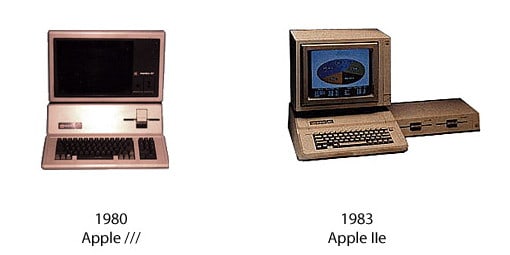
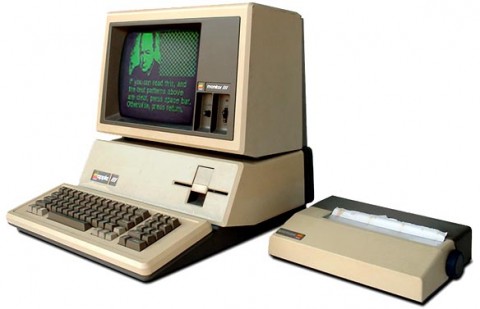
    The Apple III (often rendered as Apple ///) is a personal computer that was manufactured and sold by Apple from May, 1980 until its discontinuation on April 24, 1984. Its predecessor, the better-known Apple II, was designed by Apple co-founder Steve Wozniak. Intended as a computer for the business user market, design work on the Apple III started in late 1978 under the guidance of Dr. Wendell Sander. It had the internal code name of „Sara“, named after Sander’s daughter.

    History and design

    The Apple III was designed to be a business computer and a successor for the Apple II . It featured an advanced operating system called Apple SOS, or „Sophisticated Operating System“, pronounced „Apple Sauce“ and a new BASIC interpreter, „Apple /// Business BASIC“ (an implementation of UCSD Pascal was also offered for more structured programming). Other features included an 80-column display with upper and lowercase characters, a numeric keypad, support for a real-time clock, 6-bit (DAC) audio, 16-color graphics, and a hierarchical file system. It included a built-in 140 KB 5.25″ floppy disk drive, with up to three additional external „Disk ///“ floppy disk drives, which were only compatible with the Apple ///. In addition they required an adapter for use on the /// Plus. Originally intended as a direct replacement to the Apple II series, it was designed for backwards-compatibility of Apple II software in order to migrate users over. However, since Apple did not want to encourage continued development of the II platform, they limited its capabilities to emulate a basic 48 KB Apple II+ configuration, with no access to the III’s advanced features, a restriction which actually required custom chips to enforce.

    The Apple III was powered by a 2 MHz SynerTek 6502A 8-bit CPU and, like some of the more advanced machines in the Apple II family, used bank switching techniques to address up to 256 KB of memory (512 KB with a third-party upgrade).

    The Apple III was the first Apple product that allowed the user to choose both a screen font and a keyboard layout:either QWERTY or Dvorak. These choices could not be changed while programs were running, unlike the Apple IIc, which had a keyboard switch directly above the keyboard, allowing switching on the fly.
    The Apple III with an Apple Monitor //.

    The Apple III had a System Utilities program, which allowed system reconfiguration and file manipulation. Another program, Selector III, was designed to integrate with the System Utilities program and launch various applications. However, Apple decided not to finish this project, and the engineers and writers working on the project bought the right to market Selector III to Apple III owners for a nominal fee. However, another company, Quark Software, developed a competing product, Catalyst, the cruder interface of which was offset by program-switching capabilities and support for copy-protection, which enabled companies to license users to run programs from a hard disk without worrying that their software might be backed up or copied without permission. When Apple decided to bundle Catalyst with its new ProFile hard disk, Quark celebrated—it eventually grew into a major software vendor with QuarkXPress); and the Selector III’s developers quietly dissolved their company.

    One popular anecdote about the Apple III is probably better remembered than the machine itself: in a technical bulletin, customers who were experiencing certain problems were instructed to lift the machine 3 inches (76 mm) and drop it in order to reseat the chips. Another problem was that the circuit board used a „fineline“ technology that was not fully mature, with narrow, closely spaced traces. When chips were „stuffed“ into the board and wave-soldered, solder bridges would form between traces that were not supposed to be connected. This caused numerous short circuits, which required hours of costly diagnosis and hand rework to fix. Apple designed a new circuit board, with more layers and normal-width traces. It was designed by one designer on a huge drafting board, rather than a costly CAD-CAM system used for the previous board, and it worked.

    Some of the features and codebase of the Sophisticated Operating System made their way into the Apple II’s ProDOS and GS/OS operating systems, as well as those of the Lisa and Macintosh.

    Commercial failure

    For a variety of reasons, the Apple III was a commercial failure. With a starting price between $4,340 to $7,800 US, it was more expensive than many of the CP/M-based business computers that were available at the time.[1] The Apple III’s software library was very limited, and while sold as an Apple II compatible, the emulation that made this possible was intentionally hobbled, thus it could not make use of the advanced III features (specifically 64 KB RAM or higher, required by a large number of Apple II software titles based on PASCAL), which limited its usefulness.

    Far more importantly, the machine was plagued by numerous hardware and software bugs. The real time clock, the first in an Apple computer, would fail after prolonged use. This chip, which was made by National Semiconductor, was an example of a recurrent problem. Semiconductor purchase contracts allowed a vendor 30 days to replace defective parts. It was assumed that a vendor would test parts before shipping them, but this was not required. National had a reputation for knowingly shipping bad parts,[citation needed] confident that they could do another production run before they had to send replacements. This was not a problem for customers who put chips in sockets and had extensive repair facilities. However, Apple was soldering chips directly to boards and could not easily test a board to find a single bad chip. Eventually, Apple solved this problem by deleting the real-time clock from the specification, rather than putting in a working clock chip.

    Other widely experienced problems were alleged due to the fact that the Apple III had no cooling fan (as suggested by Steve Jobs for quieter performance) or air vents. Because of this many Apple III computers were manufactured with heatsinks, but since the system had a metal case and chips crammed together with no air vents, it was impossible for enough heat to escape. Some users stated that their Apple III became so hot that the chips started dislodging from the board, the screen would display garbled data, or their disk would come out of the slot „melted“ (which was another reason why there are very few Apple IIIs left). Jerry Manock, the case designer refuted these charges and maintained that the unit adequately dissipated the internal heat, which he proved with various tests. In the end he was vindicated as the primary culprit turned out to be a problem with the proximity between circuit board traces caused by the nascent „fineline“ technology.

    In the end, Apple had to replace the first 14,000 Apple III machines, free of charge. The customers who had bought them were given brand new machines, with new circuit boards. These did not constitute a new model: it was deemed warranty service. However for new customers in late 1981 it was a newly revised system, with twice as much memory (256K RAM) and sold for a much lower introductory price of $3,495. At the same time, Apple also introduced the optional ProFile 5 MB external hard drive.

    Apple III Plus

    An improved version, the Apple III Plus, was introduced in December 1983 and sold for $2,995 US. The III Plus fixed the hardware problems of the original III, included 256 KB RAM, built-in clock, video interlacing, and featured a keyboard in the style of the Apple IIe. However, not even the new „allow me to reintroduce myself“ campaign could salvage the III’s reputation. Possibly more relevant in the long run was the fact that the III was essentially an enhanced Apple II—newest heir to a line of 8-bit machines dating back to 1976. The year after the III was originally released, IBM unveiled its PC—a completely new 16-bit design soon available in a wide range of inexpensive clones. The business market moved rapidly towards the IBM machines and, in September 1985, the Apple III line was discontinued, having sold only about 65,000 systems. Apple co-founder Steve Wozniak stated that the primary reason for the Apple III’s failure was that the system was designed by Apple’s marketing department, unlike Apple’s previous engineering-driven projects.

    CPU
    CPU: SynerTek 6502A
    CPU Speed: 2 MHz
    FPU: none
    Bus Speed: 2 MHz
    Data Path: 8 bit
    ROM: 4 kB
    Onboard RAM: 128 kB (256 kB in revised and IIIplus)
    Maximum RAM: 256 kB
    Expansion Slots: 4 proprietary (compatible w/ Apple II)

    Video
    Max Resolution: 80×24 text, 1 bit (B&W) 590×192

    Storage
    Floppy Drive: built-in Shugart 143 kB 5.25″
    Input/Output
    Serial: optional expansion card
    Speaker: mono

    Miscellaneous
    Codename: Sara
    Introduced: June 1980
    Terminated: 1985

    Sources:
    „Apple III.“ Wikipedia, The Free Encyclopedia. 26 May 2009, 06:55 UTC. 26 May 2009 <http://en.wikipedia.org/w/index.php?title=Apple_III&oldid=292386092>.

    apple-history.com

    Apple IIe

    Apple IIe
    Apple IIe

    The Apple IIe is the third model in the Apple II series of personal computers produced by Apple Computer. The e in the name stands for enhanced, referring to the fact that several popular features were now built-in that were only available as upgrades and add-ons in earlier models. It also improved upon expandability and added a few new features, which, all combined, made it very attractive to first-time computer shoppers as a general-purpose machine. The Apple IIe has the distinction of being the longest-lived computer in Apple’s history, having been manufactured and sold for nearly 11 years with relatively few changes. For this reason, it is the most commonly recognized model in the Apple II line. The Apple IIe is well known for being used to create the cover of Yes‘ album 90125[citation needed].

    History

    The beginning

    Apple had planned to retire the Apple II series after the introduction of the Apple III in 1980, however, after that machine turned out to be a disastrous failure, management decided the further continuation of the Apple II was in the company’s best interest. So, after three and a half years at a stand-still, came the introduction of a new Apple II model—the Apple IIe (codenamed „Diana“ and „Super II“). The Apple IIe was released in January 1983, the successor to the Apple II Plus. Some of the hardware and software features of the Apple III were borrowed in the design of the Apple IIe. The culmination of these changes led to increased sales and greater market share of both home and small business use.

    Overview of new features

    One of the most notable improvements of the Apple IIe is the addition of a full ASCII character set and keyboard. The most important addition is the ability to input and display lower-case letters. Other keyboard improvements include four-way directional cursor control and standard editing keys (Delete and Tab), two special Apple modifier keys (Open and Solid Apple), and a safe off-to-side relocation of the „Reset“ key. The auto-repeat function (any key held down to repeat same character continuously) is now automatic, no longer requiring the „REPT“ key (now gone) found on the previous model’s keyboard.

    The machine came standard with 64 KB RAM, with the equivalent of a built-in Apple Language Card in its circuitry, and had a new special „Auxiliary slot“ (replacing slot-0, though electronically mapped to slot-3 for compatibility with earlier third-party 80 column cards) for adding more memory via bank-switching RAM cards. Through this slot it also includes built-in support for an 80 columns text display on monitors (with the addition of a plug-in 1K memory card, via bank-switching of 40 columns) and could be easily doubled to 128 KB RAM by alternatively plugging in an Apple’s Extended 80 Columns Card. As time progressed even more memory could be added through third party cards using the same bank-switching slot, or alternatively general purpose slot cards that addressed memory 1 byte at a time (i.e. Slinky RAM cards). A new ROM diagnostic routine could be invoked to test the motherboard for faults and its main bank of memory.

    The Apple IIe lowered production costs and improved reliability by merging the function of several off-the-shelf ICs into single custom chips, reducing total chip count to 31 (previous models used 120 chips). For this reason the motherboard design is much cleaner and runs cooler as well, with enough room to add a pin-connector for an (optional) external numeric keypad. Also added was a backport accessible DE-9 joystick connector, making it far easier for users to add and remove game and input devices (previous models requiring plugging the joystick/paddles directly into a 16-pin DIP socket on the motherboard; the IIe retained this connector for backwards compatibility). Also improved were port openings for expansion cards. Rather than cutout V-shaped slot openings as in the Apple II and II Plus, the IIe has a variety of different sized openings, with thumb-screw holes, to accommodate mounting interface cards with DB-xx and DE-xx connectors (removable plastic covers filled the cutouts if not used). The Apple IIe maintains full backwards compatibility with the previous two Apple II models, allowing most hardware and software from those systems to be used.

    Technical specifications

    Microprocessor

    * 6502 or 65C02 running at 1.023 MHz
    * 8-bit data bus

    Memory

    * 64 KB RAM built-in
    * 16 KB ROM built-in
    * Expandable from 64 KB up to 1 MB RAM or more

    Video modes

    * 40 and 80 columns text, white-on-black, with 24 lines¹
    * Low-Resolution: 40×48 (16 colors)
    * High-Resolution: 280×192 (6 colors) *
    * Double-Low-Resolution: 80×48 (16 colors)
    * Double-High-Resolution: 560×192 (16 colors) *

    *effectively 140×192 in color, due to pixel placement restrictions

    ¹Text can be mixed with graphic modes, replacing either bottom 8 or 32 lines of graphics with 4 lines of text, depending on video mode

    Audio

    * Built-in speaker; 1-bit toggling
    * Built-in cassette recorder interface; 1-bit toggle output, 1-bit zero-crossing input

    Expansion

    * Seven Apple II Bus slots (50-pin card-edge)
    * Auxiliary slot (60-pin card-edge)

    Internal connectors

    * Game I/O socket (16-pin DIP)
    * RF modulation output (4-pin Molex)
    * Numeric keypad (11-pin Molex)

    External connectors

    * NTSC composite video output (RCA connector)
    * Cassette in/out (two 1/8″ mono phono jacks)
    * Joystick (DE-9)

    Revisions

    In production from January 1983 until November 1993, the Apple IIe remained relatively unchanged through the years. However there was one significant motherboard update, a major firmware update, two cosmetically revised machines and an official compatible from Apple, in the form of slot card for the Macintosh computer. These revisions are detailed below.

    The Revision A motherboard

    At the time of the Apple IIe’s introduction, and well into the first few months of production, this motherboard shipped with all units. Graphics modes supported are identical, and limited to, that of the Apple II Plus before it. The logic board is not compatible with the ROM based firmware update (introduced some years later) and most newer plug in expansion slot cards.

    The Revision B motherboard

    Shortly after the „Revision A“ motherboard’s release in 1983, engineers discovered that the bank-switching feature (which used a paralleled 64 KB of RAM on the Extended 80 Columns Card; or 1 KB to produce 80 columns using bank-switching) could also be used to produce a new graphics mode, Double-High-Resolution, with double the horizontal resolution and number of colors of standard High-Resolution. In order to support this, some modifications had to be made to the motherboard, which became the Revision B. In addition to supporting Double-High-Resolution and Double-Low-Resolution (see list above) it also added a special video signal accessible in slot-7.
    New keyboard, with smaller superscripted black print. Note the user-added Enhanced badge.

    Apple upgraded the motherboard free of charge. In later years Apple labeled newer IIe motherboards with a „-A“ suffix once again, although in functionality they were Revision B motherboards.

    New case and keyboard

    In 1984, Apple revised the case and keyboard. The original IIe uses a case very similar to the Apple II Plus, painted and with Velcro-type clips to secure the lid with a strip of metal mesh along the edge to eliminate Radio Frequency Interference. The new case is made of dyed plastic mold in a slightly darker beige with a simplified snap-case lid. The other noticeable change is a new keyboard, with more professional looking print on darker keycaps (small black lettering, versus large white print). This was the first cosmetic change.

    The Enhanced IIe

    In March 1985, Apple replaced the original machine with a new revision called the Enhanced IIe. It is completely identical to the previous machine except for 4 chips changed on the motherboard (and a small „Enhanced“ or „65C02“ sticker placed over the keyboard power indicator). The purpose of the update was to make the Apple IIe more compatible with the Apple IIc (released the previous year) and in some respects to a smaller degree, the Apple II Plus. This change involved a new processor, the CMOS based 65C02 CPU, a new character ROM for the text modes, and two new ROM firmware chips. The 65C02 added more CPU instructions, the new character ROM added 32 special „MouseText“ characters (which allowed the creation of a GUI-like display in text mode, similar to IBM ANSI), and the new ROM firmware fixed problems and speed issues with 80 columns text, introduced the ability to use lowercase in Applesoft BASIC and Monitor, and contained some other smaller improvements (and fixes) in the latter two (including the return of the Mini-Assembler—which had vanished with the introduction of the II Plus firmware).
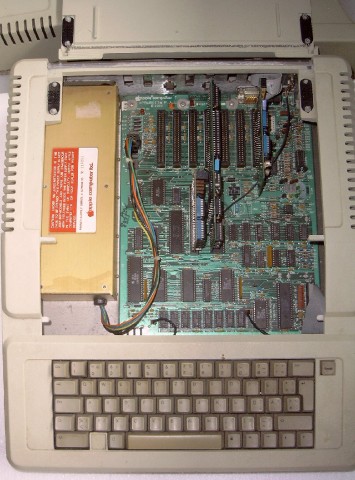
    Geöffneter Apple IIe
    Open Apple IIe
    Despite affecting compatibility with a small number of software titles (particularly those that did not follow Apple programming guidelines and rules, used illegal opcodes that were no longer available in the new CPU, or used the alternate 80 column character set that MouseText now occupied) a fair bit of newer software — mostly productivity applications and utilities — require the Enhancement chipset to run at all. An official upgrade kit, consisting of these 4 replacement chips and an „Enhanced“ sticker badge, was made available for purchase to owners of the original Apple IIe. An alternative at the time, which some users choose as a cost cutting measure, was to simply purchase their own 65C02 CPU and create (unlicensed and illegal) duplicates of the updated ROMs using re-rewritable EPROM chips. When Apple phased out the Enhancement kit in the early 1990s, this became the only available method for users looking to upgrade their IIe, and remains so right up until present day. An Enhanced machine identifies itself with the name „Apple //e“ on its start up splash screen (as opposed to the less specific „Apple ][„).

    The Platinum IIe

    In January 1987 came the final revision of the Apple IIe, often referred to as the Platinum IIe, due to the color change of its case to the light-grey color scheme that Apple dubbed „Platinum“. Changes to this revision were mostly cosmetic to modernize the look of the machine. Besides the color change, there was a new keyboard layout with built-in numeric keypad. The keyboard was changed to match the layout of the Apple IIGS, with the reset key moved above the ESC and ‚1‘ keys, the Open and Solid Apple modifier keys replaced by Command and Option and the power LED relocated above the numeric keypad. Gone were the recessed metal ID badges (showing the Apple logo and name, with „//e“ beside it) replaced with a simpler „Apple IIe“ silk screened on the case lid in the Apple Garamond font. A smaller Apple logo badge remained, however moved to the right side of the case.

    Internally, a (reduced in size) Extended 80 Columns Card was factory pre-installed, making it come standard with 128 KB RAM and Double-Hi-Res graphics enabled. The motherboard has a reduced chip count by merging the two system ROM chips into one and used higher density memory chips so its 64 KB RAM could be made up of two (64 Kbx4) chips rather than eight (64 Kbx1) chips, bringing the count down to a total of 24 chips. A solder pad location on the motherboard, present since the original IIe, for (optionally) making presses of the „Shift“ keys detectable in software, is now shorted by default so that the feature is always active. Next, in a move to reduce Radio Frequency Interference when a joystick plugs into the motherboard’s Game I/O socket, filtering capacitors were added. While this made no difference to the average user, it had the negative effect of lowering the available bandwidth to the socket, which is often used by specialized devices for such purposes as measuring temperature, controlling a robotic device, or even simplistic networking for data transfer to another computer. In such cases the specialized devices were rendered useless on the Platinum IIe unless the user removed the capacitors from the board.

    There were no firmware changes present, and functionally the motherboard is otherwise identical to the Enhanced IIe. This final model of the Apple IIe was discontinued in November 1993, officially retiring the entire Apple II family line with it.

    The Apple IIe Card for Macintosh

    In March 1991, shortly after the release of the Macintosh LC series, Apple released the PDS slot-based Apple IIe Card for the Macintosh. By plugging this card into a Macintosh LC (and later models incorporating an LC PDS slot), through hardware and (some) software emulation, the Macintosh can run most software written for the 8-bit Apple IIe computer. This miniaturized computer on a card was made possible by a chip called the Mega II, first used in the Apple IIGS computer to emulate the Apple IIe. The Mega II duplicates all the functions of a standard Apple IIe, minus RAM, ROM and CPU.

    Many of the built-in Macintosh peripherals can be „borrowed“ by the card when in Apple II mode (i.e. extra RAM, 3½ floppy, AppleTalk networking, clock, hard disk). It can even run at an accelerated 2 MHz, however as video is emulated using Macintosh QuickDraw routines, in slower machines it sometimes can not keep up with the speed of a real Apple IIe. With a specialized Y-cable, the card can use an actual Apple 5.25, Apple UniDisk 3.5 or even Apple II joystick/paddles. The Apple IIe Card is thought of as an Apple II compatible or emulator rather than an extension of the Apple II line, but included in this article for the sake of completeness.

    International versions

    The Apple IIe keyboard differed depending on what region of the world it was sold in. Sometimes the differences were very minor, such as extra local language characters and symbols printed on certain keycaps (e.g. French accented characters on Canadian IIe such as „á“, „é“, „ç“, etc, or the British Pound „£“ symbol on the UK IIe) while other times the layout and shape of keys greatly differed (e.g. European IIe). In order to access the local character set and keyboard layout, a user-accessible switch is found on the underside of the keyboard — flipping it will instantly switch the video output and keyboard input from the US character set to the local set. To support this, special double capacity video and keyboard ROMs are used; in early motherboards they had to reside on a tiny circuit card that plugged into the socket. In some countries these localized IIe’s also support 50 Hz PAL video instead of the standard 60 Hz NTSC video and the different 220/240 volt power of that region. An equivalent of the „PAL color card“ for the earlier Apple II europlus model was integrated into the motherboard of these IIe’s, so that color graphics are available without the addition of a slot card.

    Another difference with the European IIe, is the Auxiliary slot physically moved in location so it is in line and in front of slot-3, preventing both slots from being used simultaneously for full-sized cards. A few third-party cards are affected by this: some European cards that plug into both slots simultaneously and are thus unusable on American IIe’s, and some American cards that don’t fit into the case of European IIe’s because the European location of the Auxiliary slot leaves less room for them.

    Upgrades

    The Apple IIGS Upgrade

    When the Apple IIGS computer was introduced by Apple Computer in September 1986, Apple also announced it would be making an upgrade kit for the IIe available for purchase. Essentially the „upgrade“ replaced the Apple IIe motherboard for a 16-bit Apple IIGS motherboard, making it more of an outright computer transplant than upgrade. Users would bring their Apple IIe machines into an authorized Apple dealership, where the IIe motherboard and lower baseboard of the case were swapped for an Apple IIGS motherboard with a new baseboard (with matching cut-outs for the new built-in ports). New metal sticker ID badges replaced those on the front of the Apple IIe, rebranding the machine. Retained were the upper half of the IIe case, the keyboard, speaker and powersupply. Original IIGS motherboards (those produced between 1986 to mid 1989) have electrical connections for the IIe powersupply and keyboard present, although only about half produced have the physical plug connectors factory pre-soldered in, which were mostly reserved for the upgrade kits.

    The upgrade cost US$500, plus the trade-in of the user’s existing Apple IIe motherboard and baseplate (and in some cases, the upper half of the IIe case itself for very early Apple IIe units which couldn’t accommodate the new baseplate) .
    Back view of IIGS upgrade, note the new port openings and connectors.

    It proved unpopular as it did not include a mouse (which is an essential part of the IIgs, much like the Macintosh); the keyboard, although functional, does not mimic all the features and functions of the Apple Desktop Bus keyboard, as well as lacking a numeric keypad; and some cards designed for the new 16-bit machine did not fit in the Apple IIe’s slanted case either. In the end most users found they were not saving much, once they had to purchase a 3.5 floppy drive, analog RGB monitor and mouse. Although it could use some IIe peripherals, most of them became obsolete in the upgrade due to their function being already built-in. It did however make an attractive upgrade for Apple IIe users wanting to use the machine strictly in IIe-emulation mode (ignoring the native part of the machine), which provide faster CPU operation, 256 KB RAM, a clock and many built-in peripherals via the backports.

    CPU
    CPU: MOS Technology/SynerTek 6502
    CPU Speed: 1 MHz
    FPU: none
    Bus Speed: 1 MHz
    Data Path Width: 8 bit
    Address Width: 8 bit
    ROM: 16 kB
    Onboard RAM: 64 kB
    RAM slots: expansion via 1st slot
    Maximum RAM: 128 k, with Extended 80 Columns Card
    Expansion Slots: 8 proprietary

    Video
    Max Resolution: 40/80×24 text, 4-bit 40×48, 6 color 140×192, 4-bit 140×192, 1-bit 240×192, 1-bit 560×192

    Storage
    Floppy Drive: optional

    Input/Output
    Speaker: mono

    Miscellaneous
    Family: Pre-Macintosh
    Codename: Diana
    Introduced: January 1983
    Terminated: March 1985

    Sources:

    „Apple IIe.“ Wikipedia, The Free Encyclopedia. 5 May 2009, 21:21 UTC. 5 May 2009 <http://en.wikipedia.org/w/index.php?title=Apple_IIe&oldid=288134928>.

    apple-history.com

    This entry is published under the GNU General Public License.

  • Werbespot "Think different" (1997)

    Here’s to the crazy ones.
    The misfits.
    The rebels.
    The troublemakers.
    The round pegs in the square holes.
    The ones who see things differently.
    They’re not fond of rules.
    And they have no respect for the status quo.
    You can quote them, disagree with them, glorify or vilify them.
    About the only thing you can’t do is ignore them.
    Because they change things.
    They push the human race forward.
    And while some may see them as the crazy ones,
    We see genius.
    Because the people who are crazy enough to think
    they can change the world,
    Are the ones who do.

  • TV ad for the first Apple Macintosh (1984)

    „The computer for the rest of us.“

  • Steve Jobs: "Computers are like a bicycle for our minds."


    Steve Jobs: „Computers are like a bicycle for our minds.“

  • Steve Wozniak presents the Apple Historical Museum (1984)

    Steve Wozniak, the inventor of the personal computer, provides us with a tour of historical Apple II products. This absolutely classic video clip was on the Apple IIc rollout VHS tape, from 1984.


    Steve Wozniak presents the Apple Historical Museum (1984)

  • Apple Computer – TV-Doku "Lost and Found" (History Channel)


    Ein Clip aus der TV-Doku „Lost and Found“ vom History Channel

  • The Macintosh Design Team – The Making of Macintosh – Part II (Byte – Feb. 1984)

    Steve Jobs and Bill Atkinson (Photo: Norman Seiff)
    Steve Jobs and Bill Atkinson (Photo: Norman Seiff)

    Part I – click here

    Jobs: Another thing is that you can run RS-422A twisted pairs, which means I can run these things for several hundred meters. I can string lines if I have a laboratory and a computer on my desk, do whatever I want to do. They aren’t DB-25s. We’ve been living with giant connectors now for years but using only a few of the pins. So, again, we tried to save a little bit of space in the back because the connector space we have is limited. We tried to cut down the cost to the customers again, and so, for connecting to devices like printers and modems, which we offer and which are the most prominent, we just supply the cables. We also will supply cables from one of these things to a variety of DB-25s – for the modem version, the printer version.

    Atkinson: Lines 2 and 3 are switched on a modem versus a printer, so you just use a modem cable or a printer cable.

    BYTE: From a very early time you knew that you wanted to take advantage of Lisa’s software technology, and you also had the goal of making that possible at low cost. When did you have a consensus on exactly what this hardware would have to be to achieve that goal?

    Smith: In 1981 we started looking at the Lisa. I came up with a proposal that said it ends up costing $14 more to use a 68000 with 64K bytes of memory than it does with 6809-based machines, if you count power supply. It turns out that it’s actually easier to interface memory to a 68000 than to a 6809. So in January we started really looking at the 68000 and the work that Bill was doing.

    In June of 1982 we finally decided on what we thought was enough video. It turns out that the original machine had 384 by 256 pixels. We chose that because we thought we had a shot at squeezing the machine down into 64K bytes, and we didn’t want to throw away a quarter of the memory just for the screen.

    Atkinson: The thing that drove us is the 80 columns. In a word processor, we really wanted the lines to break on the screen at the same place they break on the printer. There are two kinds of word processors. There are the ones where you just have a string of characters and you see them however they wrap on the screen. Screen wrap is a function of the screen, and how characters wrap on the printer is the printer’s doing. Then there are word processors where what you see is what you get. You lay out a line and you know it’s going to break at the same place on the printer as the screen, so you can do columns and tabs and a couple of columns of numbers. Then you have to have enough pixels to generate a full printer line across. We thought we could do it with 384, and we tried it with real live documents – and we couldn’t do it. You could do it with 512, but you couldn’t do it with 384.

    Smith: The diagonal lines look better, too; the jaggies are removed somewhat, and things like that. So, with that, we said, OK, what’s that going to mean? And we ended up with 128K and…

    Atkinson: 22K bytes on the screen, and in a 64K-byte machine you couldn’t have afforded it. That drove us to 16 RAM chips instead of 8. Hertzfeld: By then, we knew we were going with 128K bytes anyway, to run the applications.

    Jobs: I just thought I’d show this to you. This is the IBM video board; it’s only video, nothing else. It’s 69 integrated circuits, more chips than an entire Macintosh, and it basically does nothing. And it doesn’t even do that very well.

    Espinosa: Forty percent more chips than the Mac.

    Jobs: So that sort of gives you a feeling. And again, that just has the video on it. Macintosh, in addition to having video that’s far higher in resolution and far faster, has a 32-bit microprocessor, 128K bytes of RAM, 64K bytes of ROM, two serial ports, the mouse, the serial, keyboard, and mouse interface, the incredible sound, the clock calendar, the disk controller…

    Smith: We rolled the whole disk controller into one chip.

    Hertzfeld: And it has Lisa’s graphics and user-interface software built into every board.

    Jobs: Andy was sort of the software technical leader behind the project, from its inception. As Andy puts it, software sometimes stands on its head to get rid of a chip in the hardware. And so, with a system as powerful as this, we wanted to take advantage of all the features, for instance, in the serial chip and the disk and stuff. We really wanted to be able to have the serial ports reading while the disk is spinning, while the mouse is moving, while it’s making sound. You know, all with that single board.

    BYTE: What were the roots of that operating system?

    Kenyon: When we started, of course, we were looking at the work Lisa was doing, and the Lisa group was rolling its own operating system, and it just didn’t seem appropriate. We took the graphics software, which was perfect for our machine.

    Capps: The Lisa’s operating system took a lot of the user interface. For the window manager, even the memory manager, we started with what Lisa had.

    Hertzfeld: It turns out that Quickdraw is built on top of what Lisa would call the intrasegment memory manager. You relocate little objects. We took that because Quickdraw required that support, and we sort of turned it into our system-wide memory manager. Even the Lisa group uses it only for the intra-application memory manager. Someone mentioned a neat way to do a file system, and we thought about it and said, “Gee, that’s a good way of doing it,” and so we did. A lot of it was experience on the Apple II, knowing what was sort of bad there – what we wanted to do great here. That at least was the conception of the asynchronous I/O. I knew from the Apple II that when you make a disk request it waits there for a whole second, a million microseconds, just waiting for the disk to come up to speed. We should be able to do other useful work while that’s happening. On the Apple II if you want to make a beep, the whole processor, the entirety of the machine, is devoted to making a beep. And when you’ve got all the horsepower of the 68000 there, you don’t want to waste it all on making sounds.

    Atkinson: We still make a beep with the processor.

    Hertzfeld: But we time-slice the processor such that you can be doing other things. It happens on the interrupt level instead of being dedicated. Macintosh uses the processor for everything, just like the Apple II does. In terms of the disk, we have the same disk-controller architecture as the Apple II, but we are just a little more sophisticated in how we use interrupts. We give the time back to the applications while the I/O is going on.

    BYTE: Can you say more about the custom disk controller?

    Smith: Sure. A long time ago we sort of figured that everybody who was doing designs at Apple with disks loved what Woz [Steve Wozniak] had done on the Apple II. Ill never forget, the first time I looked at the Woz controller I said, “OK. Well, this must be the interface disk controller. Where’s the disk controller?” I never found the disk controller. And we’ve just been in love with the way that that’s done. It’s used to modify group code. One of the things we knew, though, was that disks would be going faster in the future. So we initially designed this chip so the whole company would be able to have an ultra-low-cost way of using Wozniak’s disk technology for every product. But we knew that we weren’t just going to be going at 4 microseconds per bit, that twice that would become an industry standard … at least an Apple internal standard. So we built in a mode, a high-speed mode, so that it can go twice as fast.

    Atkinson: While you’re getting input from the serial port at 19,200 bps, you can be writing to the disk and not missing a beat. It’s not the buffer that’s doing that. It’s Larry Kenyon. Every 4 nibbles, you look to see if there’s something on the port, because in one sector’s time, 24 bytes go by.

    Jobs: After we reexamined everything, including the disk format, we said, “Do we want to go to MFM [modified frequency modulation]?” And the more we reexamined it, what became clear was that the original idea that we had for a disk in 1978, which we are still using, is great.

    Atkinson: We get 400K bytes on this thing, while most people get only 270.

    Jobs: As an example, our scheme has twice the margin of MFM. In other words, when you’re shipping a mil- lion or two million computers a year, which we intend to do, when people are buying media from 10 different sources and they expect to take disks out that were recorded in Alaska in really cold weather and stick them into machines in Florida in a heat wave and have them work, that margin is really important. If you want to equate that to reliability, we are significantly more reliable than any other disk system on the market, while having higher capacity. So that was the key decision, to stick with the same encoding format and the same scheme that we’ve used since 1978. So, while everyone else is running at roughly the same rates as Apple II, the IBM PC, and everything else, we doubled it on Macintosh. We set a new internal standard with the 3V2-inch disk and this new single-chip controller. And every new 32-bit product at Apple will use that new standard. The media, the sector format on that media, the disk controller, and the routines and everything to drive them is a new Apple 32-bit standard that you’ll see com- ing out in every future product that we do in that family.

    Smith: There were some voices within the company that said, “Oh, you guys ought to go with standard formats and things like that.” We looked at doing that and it turns out that it takes more chips to interface to a standard floppy-disk controller, and we have…

    Jobs: Well, I can go get the IBM floppy board. It looks to have about 45 to 50 chips on it…

    Espinosa: I’ll come and help you carry it.

    Jobs: .. .including an LSI [large-scale integration] disk controller – far less performance, far less capacity, far higher cost.

    Atkinson: And less reliability.

    Jobs: Oh, far less reliability. Larry’s software senses the disk speed, and Burrell’s hardware can adjust to one of four hundred speeds. So if it’s written on something that’s a little out of whack, we can just adjust right down to the necessary speed and read it. Everything on the Macintosh board – the serial timing, the disk timings, the microprocessor timings, the video timings, the sound timings – comes from one crystal oscillator and is synchronized from one source. And, again, it’s better, of course, technically to do it that way. Everything works much better, but it also saves parts, and we can offer this thing cheaper to customers. And most of this stuff customers will never ever realize or care about anyway. I mean, who cares how many crystal oscillators you have? But you do care about how big your computer is. You do care about how much it costs, and you do care about how well it works.

    Atkinson: If you ever drop your computer you find out quickly how many crystal oscillators you have.

    BYTE: So with the variable speed in the disk drives, I guess there’s no problem having two drives that are 3 percent different in speed.

    Jobs: We read it and adjust it so that the speed is accurate relative to that crystal. That crystal on the board is superaccurate. We can adjust the disk drive relative to that superaccuracy.

    Atkinson: You force all the disks to go at exactly the same speed by having the software constantly monitoring the speed and saying, “Ah, it’s running a little slow; jack it up a little bit,” so that each disk doesn’t have to be adjusted at all. You switch disk drives, and the new one will run at exactly the same speed because you force them all to.

    Smith: It turns out that the speed variations occur partly because you plug in a new cassette that loads the motor down in a different way and also because of temperature variations that cause very long-term drifts in the disk speed. Using a little bit of the processor to fix that doesn’t cost us any performance at all on the system.

    BYTE: What about the display electronics?

    Atkinson: Where is the display controller?

    Hertzfeld: It’s hidden.

    Jobs: If you bite into that IBM display board, it’ll totally flicker if you do it at the wrong time. You’ve seen that, right? Woz just came up with this really brilliant way to do the Apple II. He realized that memory was about twice as fast as the microprocessor needed it and twice as fast as the video needed it. So he put the microprocessor over here and he put in essence the video over here, and he put some multiplexers in the middle. He shared the exact same memory between the two in a way such that this one thought it had all the memory all the time and this one thought it had all the memory all the time, yet they shared the same memory! All this thing had to do was write into certain memory locations and, magically, it would appear on the screen. The microprocessor never even had to think about the screen. All it did was look at memory locations.

    Atkinson: And there was no way to glitch the video because accesses were mutually exclusive.

    Jobs: Right. And so it turns out that, try as we might, we have never been able to find a better way to do it.

    Atkinson: At the same time that the processors have gotten faster, memory’s gotten faster; the memory is still twice as fast as the processor.

    Jobs: And so, again, it gives you greater performance, because you don’t have to write only at special times and slow yourself down. It cuts the chip count way down because you don’t need two banks of RAMs, so the customer’s not paying for these extra chips, and it just makes a more elegant product.

    BYTE: How far does the similarity extend between the Apple II video and the Mac’s video?

    Smith: We have a three-part memory architecture on Mac. We have a DMA window for sound, video, and CPU… shared by three devices. Also, what we do that is a little more sophisticated than Apple II is return memory cycles to the processor during horizontal and vertical retrace. And with the analog design we’re able to lengthen the horizontal retrace interval, which gives us more performance for graphics by making more time available to the processor from memory and giving the analog electronics more time to retrace the beam. On the Apple II, Woz sort of designed this logic board and the power supply was kind of added. On Mac, we really designed the entire system as a complete system from the ground up, so we used different constraints. I would say there’s not much similarity. The great thing about Mac as a product is that it really wasn’t designed as just this piece over there and this piece over there and this other piece… All of it was designed in parallel, everybody knowing what everyone else’s job was.

    BYTE: How did you decide on the appearance of the machine?

    Manock: Our goal in the beginning was portability. We actually had this cardboard model that looked amazingly like the Osborne. And that was way before the Osborne came out. As I said, portability was primary here, and this version had an attached keyboard that had a sort of rubber boot around it that would fold up and give you protection over the screen. Steve really changed the emphasis of the product one day when he said that we didn’t want portability to be the primary aspect of this, but we did want it to take minimal desk space. With that goal in mind, we realized that the keyboard didn’t have to be exactly the width of the computer.

    Jobs: To use the earlier design you had to have some sort of arrangement to tilt it up. And what we noticed was, well, fine, what if you just lift the back up here like this? Then, because you have all this space underneath, you could put the floppy disk underneath. So you make a unit that’s more vertical, has a smaller footprint.

    Atkinson: It has to be up enough so your eyes can see it anyway; you need the height.

    Manock: Steve thought, too, I think – in a gut reaction sort of way – that everybody was going low profile and wide, and we never have wanted to be a “me, too.” I think our vertical format is correct when you think of human factors.

    Hoffman: Jerry, you might want to turn the back around. We made it truly international. I think it’s one of the few products aside from Lisa that is completely usable anywhere you care to take it.

    Manock: Did you see the icons on the back?

    Hoffman: We started out with the case and went from the outside in, trying to make it more and more international the more we thought about it. And Jerry was just great as soon as he realized that we really did want to bring it to the whole world. He had marvelous ideas on how to eliminate every word of text, take everything off the package so that we don’t have to be an American product anywhere that we go.

    Jobs: In Mac, there’s no English on the outside of the case. Everything’s iconic. And there is absolutely no English in the ROM. It is universal in nature. When the thing comes on it puts a few icons on the screen. If something goes wrong, it can’t boot or something, it puts a frowning Mac on. If it’s booting it puts a happy Mac on. It loads all the languages, all the country-specific stuff, off the disk. So, because the keyboard is detachable and mapped anyway, to localize Mac all you do is change the keyboard, manuals, and the disks. Nothing in the box has to change.

    And another real breakthrough is this thing called Resources that Bruce Horn invented.

    Hertzfeld: The data is factored out from the code. You know, most programs are a mixture of control logic and just raw code.

    Atkinson: The virtual-memory architecture on the data parts of the program allows us to factor it out so that, without rewriting a program at all, without recompiling or relinking the program, I can take a copy of Mac Paint and in 15 minutes make a German version.

    Hertzfeld: Because all the text is kept in a well-known, well-defined place.

    Horn: Until December, people didn’t really know what the resource manager was, because they really hadn’t had any contact with it, besides me. I knew what I wanted from it because I had to do Finder and all that other stuff. Andy just looked at it over time and figured out what you could do with it. And I was trying to say, well, this can do this and this… It was really Andy having the biggest view of the system saying that this could really be a great thing for a lot of stuff.

    Hertzfeld: Another thing to ask Bruce about is the Finder, which is our most important application, the first thing that comes up on the machine. That’s the program with all the little icons, the desktop manager, I guess we’re calling it. That’s Bruce’s conception and communication.

    Hoffman: There are numerous subtleties with this. Picture a dialogue box, for example. A dialogue box, when you put English text in German, starts overflowing its limits and starts looking very different. You have a button that says, “Put this away.” In German, that takes a paragraph and overflows the box… But Resources lets us change not only the text but also the physical look of those dialogue boxes, or anything, through something called Resource Editors.

    Jobs: Otherwise, you’d have to get into the source listing. You’d have to change not only the languages, as Joanna said, but also the geometries of the dialogue boxes and make them bigger. It would take you awhile; it’s not something that’s impossible, but it’s something that never gets done. And it’s certainly something that you have to be the originator of the program to do. What we’ve done by pulling all the language-specific stuff out, through this beautiful mechanism called Resources, is write these other programs called Resource Editors. By running a Resource Editor, you could, if you knew German, simply run a program on the program, get in there – literally on the screen – and just stretch the boxes bigger. You could select a text and retype it in. German and move things around if you wanted. You can examine every icon, every dialogue box, every alert box, every pull-down menu, everything, without being a programmer, without getting the source code, and very quickly, too, using the user interface of the Macintosh.

    Atkinson: Anything that XYZ software company put together, even though the company didn’t think about Taiwan, will run in Taiwan.

    Jobs: But do we want it to run in Taiwan?

    BYTE: Are you going to market it aggressively in Japan?

    Jobs: Yes.

    Hertzfeld: My favorite thing about Resources, being selfish, is that the same facilities that allow us to translate English into 7, 10, 20, a million different languages are the same facilities we use to translate technish to English in the first place.

    Hoffman: The other component of this is that it allows us to not just introduce products that feel to the native user like a native machine, natural to them, but also that we can start coming very close to making simultaneous product introductions. The software that is developed in the U.S. can fly over there for them, for the fragmented markets in Europe, for example. Europe does not allow for the same kind of development of software houses as the U.S. because the markets are all so fragmented you can’t amortize development of the software over as large a user base. But given that the Europeans now have the capability of using a localized, globalized software, if you will, their market grows because each individual software developer in France now can view the whole world as a market. We feel that it will give an impetus to the development of software developers, third parties, in Europe, and in more fragmented markets as well.

    Smith: An international power supply, too, so the exact same unit basically can be used anywhere in the world.

    Egner: It doesn’t care whether it’s 50-Hz input.

    Manock: Just one additional thing on these: the icons on the back are from the International Electrotechnical Commission (IEC). We didn’t invent all these ourselves.. .wherever possible we used symbols that already existed – for example, AC line power – that are world standards. Where we didn’t have symbols that existed, we used the IEC’s closest symbol as best we could and then added what we thought made sense. For example, we needed a symbol for a modem, so we started with IEC’s telephone symbol. We tested them to make sure there was good recognition. Well submit these new icons to the IEC to have it suggest that they be the standards added to its encyclopedia of symbols.

    BYTE: What is this machine going to make possible that other comparably priced machines have not made possible? How will it change the personal computing scene?

    Jobs: Right now, as you know, when you use a word processor, it will do two or three things. The first thing Macintosh will do is make the existing types of applications an order of magnitude easier and more approachable for people. Therefore the available market for this machine is going to be giant compared to the available market for the people who are willing to invest 40 to 100 hours learning to use their computers. That’s the first thing.

    The second thing is that there are going to be new types of applications available that could not be available on the current generation of personal computers – it is technically impossible to do. The perfect example is Paint. Paint is impossible to do on an Apple II or an IBM PC or any of the other first-generation products. You can do a mockery of it, but you can’t really do it. And there are going to be lots of applications like that. You’ve seen Lisa Project. That, of course, will be running on Mac. And we don’t even know the kinds of applications that are going to come out in six months to a year. As an example, well be able to laser-print output from this thing by next June, and that is pretty exciting to us. So, if we sell these on a university campus, you’ll be able to take your disk into the library and get output off a laser printer, which will be approaching typeset quality. That’s the kind of stuff we’re doing; you just can’t do that on a current-generation personal computer.

    And then the third thing is what Burrell and Larry and Andy and the other software people have done. When we shipped the Apple II, we fundamentally shipped about 2K bytes of ROM with system code. The IBM system’s got 8K bytes, but it’s really kind of loose as a goose; it’s about 4K bytes by our standards of code. Mac has 64K bytes of the tightest, most elegant code that this company’s ever written. Most of the computers now are basically shipping a file system and a few drives, but what’s really interesting is that on top of that, we’ve layered on memory management and on top of this is Quickdraw.

    Jobs: Mac’s a completely open machine – we’ve got a book called Inside Macintosh that tells all the secrets of it. But we’re going to try to get a little uniformity through the carrot rather than the stick. And the carrot is that there’s a finite amount of RAM in this machine, and we’ve done all these things for you in ROM. Now, you can do them yourself, there’s nothing that says you can’t do them yourself, but if you do, you’ve got to write them, which is going to take time and means you’re going to be slower to get to market; you’ve got to chew up precious RAM space, and the chances are pretty good that we did a better job than you’ll do. So we’re going to try through the carrot to get a little bit of uniformity in the user interface in some of the ways the things are done.

    Hertzfeld: See, we’re really a 192K-byte machine, and if the programmers want to throw away 64K, then they’re doing a dumb thing.

    Jobs: We’re a 192K-byte machine that deep-freezes 64K.

    Hertzfeld: Highly timed, tested, debugged, highly compact, very fast, very high-quality consistent code.

    BYTE: What are all the factors in this that make it go so fast?

    Hertzfeld: Sweat.

    Jobs: Burrell, Andy, Larry, Bill – how long did you work on Quickdraw?

    Atkinson: Four years.

    Hertzfeld: All of us care a lot about performance. Surprisingly, that’s unusual. A lot of people don’t care if their system’s…

    Atkinson: Like Quickdraw. I won’t even count the first runs in Pascal, but the first runs in assembly language were running 160K bytes, before I added a lot of the new features. It’s now down to 24K bytes with lots more stuff in it. Character-drawing speed is one you look at for drawing an arbitrary size character, an arbitrary starting pixel clipped to an arbitrary area. We were running, when it was being developed on Lisa, about 1000 characters per second the first time. Well, I got that up to 4000. Mac is running about 7000. That’s seven times 9600 baud. This is typical of all of our software packages here. You go through, get the best algorithms first, get the stuff right. Then crunch it down, make a first pass in Pascal, get the algorithms right, find the cleanest algorithms, find all the corners, and make sure they’re tested. Then I translate it into loose assembly language to get down into assembly language and get it working. Then I’ll go through and get all the bugs out again, and I’ll go through and do fine register alloca- tion to figure out what’s the most important thing. This little baby, the 68000, has sixteen 32-bit registers sitting there, and the way you get performance out of that is to keep them full. Keep the registers full of important stuff all the time. That’s the way you make this processor sing. So you go down and you do register alloca- tion, and then you don’t stop. Then you feed it back, you get your people to use it.

    Quickdraw was designed by “pull” from applications rather than “push” from the design team. You provide a facility, watch the applications group try to use it, understand where they misunderstood something – maybe you’ve got a bad model, you want to make it simpler and cleaner – or where they don’t have enough performance. And then you go back and you measure, measure, measure, measure. Optimization without measuring is wasted time. Find out where the application’s really spending time and go whump on that code. And any other cases they’re very seldom using, squeeze them down in size, and stretch the other ones. There’s always a trade-off between size and speed. Stretch out the common cases, let them be bigger and much faster, and then keep the generality by squeezing down the infrequent cases. So play your odds. People draw characters in OR mode a whole lot, and OR mode is about twice as fast as the other modes, so 95 percent of all characters are drawn in OR mode. Statistical measuring of the use of the thing allows you to get much more performance on your average throughput than you can if you don’t go back and measure.

    I think we all believe that system software should be done in assembly language at this stage of the game because high-level languages can’t give you the performance and the code density that you can get out of assembly language.

    BYTE: So far, it has seemed that with all the systems that have mice, all those that are on the market, you pay a great price in terms of performance to get ease of use.

    Atkinson: You make a responsive system; it isn’t just draw some characters out there. It’s also, remember where you put them because if the guy touches on them you want to light them up. There’s a lot more guts in that application.

    Jobs: It’s not just systems that have mice. What’s happening is there are a whole bunch of things that go with the mouse. It’s not just hanging a mouse on a first-generation personal computer and using the same old, fixed-pitch text and things like that, just replacing four cursor keys. What we’ve done here is take a quantum leap, where, in addition to having the mouse be the major pointing device, we’ve gone to full proportionally spaced fonts, totally software-painted on the screen, any size, any shape… totally new architecture for displaying things to the user.

    Atkinson: But the responsiveness is where the code goes.

    Jobs: The responsiveness and the fact that there isn’t a mouse-based system out yet that uses a 68000. We’re obviously using the power of the 68000 in addition to this code.

    Smith: There are some tricks we played in the hardware, too. For example, we knew that the ROMs would have real important things in them. So we made the ROMs sort of read-only cache memory, whereas the RAM has to contend with video and sound for access, so we cut that down to the bare bones, but the code that’s in ROM, like Bill’s graphics and the other stuff, can run as fast as you can run a 68000.

    Jobs: If you look at the really great applications, even on first-generation personal computers, most of them are written in assembly language – Visicalc, 1-2-3 – it’s like if you’re going to sell a million of something, it pays to handcraft it in assembly. If you’re going to sell 10 of something, it prob- ably doesn’t. If we’d written this in Pascal, we would have been able to fit a fourth as much code in the ROM or would have to have four times the ROM, and you wouldn’t have had the performance. Because we’re going to sell 10 million of these things in the long run, it pays to super-handcraft it; we only have to do it once. Every time these ROMs are burned, it doesn’t cost us any more engineering. . .it’s all been done up front.

    Capps: Because we cared enough to do it as well as we possibly could.

    Jobs: We took a 12K-byte Pascal program running on a Lisa and we said we want to do this in 2K and make it faster. But we had that extra year to do that. And we also had the motivation, of course.

    Atkinson: When you’re writing assembly, you know each instruction is going to take 2 microseconds, it’s going to take 4 bytes of memory. In Pascal, you’re removed from that, so you don’t concentrate on performance as much. When I’m doing I/O stuff in assembly language I look at the theoretical maximum speed you can run at. Why not do it as fast as you can possibly do it? Especially when you’re doing disk I/O stuff. How fast can you get into an interrupt and out?

    BYTE: Andy, let’s talk about the early days, after it had become Macintosh.

    Hertzfeld: I don’t know, there’s something that makes a job a little more fun to work on when the odds are against you. And that’s sort of how it was in the early days. I was maybe the fifth or sixth person to come work on it. Steve took me over to this little building separate from everywhere else, where there were these incredibly great people working on this little wire-wrap PC board. All it could do when you turned it on was write “hello” on the screen about 80 times. And everyone was incredibly excited to see it write “hello” on the screen because it meant that the central processing unit was there and all that potential was there to be mined. I spent my time mining that potential.

    The very first time we got an early version of Quickdraw running, and we got the mouse going – that’s just an incredible thrill. Or getting back the first PC board – we all went out for pizza on Friday night. We got the boards in about four o’clock Friday afternoon, and Steve said, “Well, if you get these done before midnight, we’ll take you for pizza,” and we stayed there…not because we wanted the pizza, but because we wanted to see that board working. And I think that none of our Mac PC boards have ever had to have a wire run to fix something, which is pretty amazing. That’s the attention to detail that you just can’t get people to do for money. We do it for love.. .this is the most important thing in our lives .. .to make that great computer.

    It’s fun for me because I like operating on a systems program where I can operate in an environment where there’s not that much support. In the early days when I first started here, the first thing I did was come in and write all kinds of crazy demos, stretching things around on the screen and making balls bounce, and one reason to do it was that I didn’t want to write the system code until I was good at writing 68000 programs. So I just wanted to learn by having fun, and the other reason is that it gets people excited about it. Just this raw hardware sitting there doesn’t do too much, but once you start making this fun thing happen and that fun thing happen, the excitement starts getting generated. You get to attract other good people, and one by one we picked up on more and more people. We were very, very selective; it was very hard to find people to work on Mac software, because on one hand we had the very high goals of doing this research, Xerox PARC-like stuff with uncommon, high technical standards. On the other hand, we had a very inexpensive, limited-memory machine. So all the Xerox PARC-type guys who came and interviewed said, “Oh, you don’t have 2 megabytes? Forget it, I don’t want to work on this thing.” They’re all used to their Dorados. But gradually we found great people like Larry and Bruce who were turned on by the dream, and they came and joined our band, and I guess we reached critical mass.

    Atkinson: Most of the early people were recruited from Apple.. .and we have a pirate’s flag that we sometimes put on the roof. The idea is we’re pirates and we go around and try to steal the best we can from anywhere we can get it, and mostly that’s been from Lisa. A lot of it’s been from Lisa, but it’s true in initially putting together the team, too; we try to get the best people we can from anywhere in the company.

    Hertzfeld: One of the slogans Steve came up with when we had a retreat in January was “Let’s be pirates,” the idea being that we were mavericks out to blow people’s minds and overturn standards, create new standards, not do things like everyone else.

    Atkinson: There was always the thrill that this was going to be the one project that was probably the most amazing thing you were going to be doing in your life.

    Hertzfeld: And the other slogan was “The journey is the reward.”